App Information
Screenshots


About This App
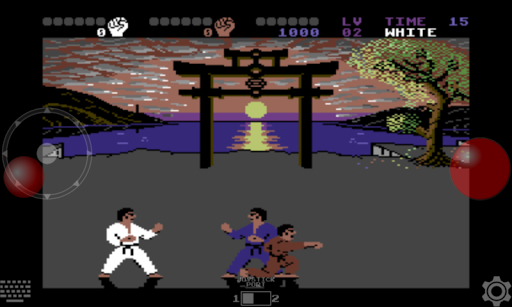
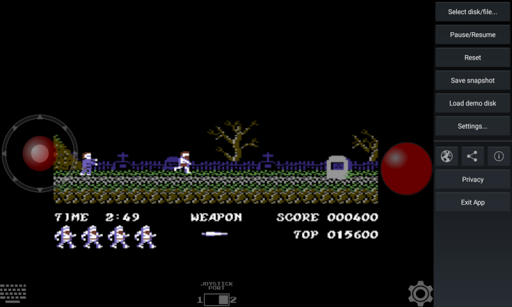
Emu64 XL Emulator – A droid64 based Commodore 64 emulator fast and very easy to use. The emulator comes with various programs and sources written in the famous CBM64 basic language.
Are you looking for way to play your favorite 8-bit retro games but your old Commodore 64 computer is not working anymore? Many peoples want playing classic C64 games but they don’t have original hardware. The Original Commodore 64 device is too old and finding working one is very hard. Then Emu64 XL is perfect solution for you, because it brings all the classic gaming experience right on your iPhone or Android device.
Emu64 XL Emulator
Emu64 XL is a powerful Commodore 64 Emulator App for iPhone and Android Users, that was developed by Raffaele Amuso from Pentawire. This is a VICE based C64 Emulator that emulates all Original Commodore 64 games and programs with rich graphics and stereo sound. The emulator comes with pre-installed programs written in famous CBM64 basic language, so you can start playing from beginning without any problem.
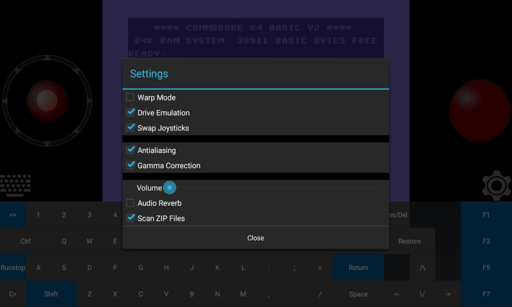
Emu64 XL Emulator perfectly emulates the graphics, sounds and peripherals just like original Commodore 64 hardware. It also has keyboard with same layout as the original one. You can load .T64 files and .D64 files just like old floppy disks and play your childhood favorite games. The Game emulation speed is very good on latest model devices but if you are using old models the speed may slow down little bit.
Emu64 XL C64 Emulator Features:
Fast and easy to use Commodore 64 Emulator.
VICE based emulation engine for perfect performance.
Emulates all Original C64 games and programs.
High-speed game emulation with rich graphics.
Stereo audio sound just like original hardware.
Pre-installed CBM64 BASIC programs included.
Keyboard with same layout as original Commodore 64.
Virtual joystick support for both port 1 and port 2.
Load .T64 and .D64 file formats easily.
External game controller support.
Hardware peripherals like gamepads, keyboards support.
Compatible with iPhone, iPad, Android devices.
Develop software or play vintage 8-bit games.
Clean Interface and Perform very fast.
Free to download and use.
Regular bug fixes and updates.
Download Emu64 XL Commodore 64 Emulator on iPhone, iPad & Android
Emu64 XL Commodore Emulator is wondrous retro gaming app that brings blasting experiences of 8-bit computing era on your modern device. This light-weight emulator supports all classic C64 games and offers tons of amazing features like Virtual joystick, External controller support, Multiple file format support and more. These new features brings limitless joy and endless fun to your gaming experience on iPhone or Android Device.
This emulator app available on Official Apple App Store for iOS Users and Google Play Store for Android users. So you can directly download it from official stores without any jailbreak or PC. The app is completely safe to use and doesn’t bring any virus or malware on your device.
Install Emu64 XL Emulator App on iPhone, iPad No-Jailbreak
Step.1) At first, Open the Safari browser or App Store on your iPhone or iPad Device.
Step.2) Then Search for “Emu64 XL” in App Store search box.
Step.3) After that, Tap on the GET button next to Emu64 XL app icon.
Step.4) Now wait for some time and the app will start downloading and installing automatically on your iOS Device.
Step.5) Once download complete successfully, Go back to your iPhone home screen and tap on Emu64 XL app icon.
Step.6) Finally, Launch the C64 Emulator app and start playing your childhood favorite Commodore 64 games on iPhone or iPad for free, No-Jailbreak / Computer.
Install Emu64 XL Emulator on Android Device
Step.1) First, Open the Google Play Store app on your Android Device.
Step.2) Now Search for “Emu64 XL” in Play Store search bar.
Step.3) Then Tap on the Install button to start downloading the emulator.
Step.4) Wait for installation to complete on your device.
Step.5) After successful installation, Open the app and enjoy playing C64 games on Android Device.
Load Game ROMs on Emu64 XL Emulator
Once you installed the Emu64 XL emulator on your device successfully, you need to add game ROM files to start playing. The emulator supports .T64 and .D64 file formats which are same as old floppy disk formats.
Step.1) Download your favorite Commodore 64 game ROM files in .T64 or .D64 format from trusted sources.
Step.2) Launch the Emu64 XL app on your iPhone or Android device.
Step.3) Tap on the Load option from main menu.
Step.4) Navigate to where you saved the ROM files and select the game you want playing.
Step.5) The game will load automatically and you can use virtual joystick in port 1 or port 2 to control the game.
Step.6) You can also connect external game controllers or keyboards for better gaming experience.
Frequently Asked Questions
Q: Is Emu64 XL free to download?
A: Yes, Emu64 XL is completely free to download and use on both iOS and Android devices.
Q: What file formats does it support?
A: The emulator supports .T64 and .D64 file formats for loading games.
Q: Can I use external controllers?
A: Yes, you can use hardware peripherals like gamepads, joysticks and keyboards.
Q: Does it work on iPhone?
A: Yes, it works on iPhone, iPad and iPod Touch running iOS 11.0 or later.
Come aboard this wondrous 8-bit gaming journey and get a load of endless retro gaming fun with Emu64 XL Commodore 64 Emulator on your device today!
Thank’s for visiting GBA Emulators iOS
Emu64 XL APK Download
| Type | Size | Action |
|---|---|---|
| iOS | 7MB | Download v1.2.0 |
| APK | 7MB | Download v1.2.0 |